
Billing Assistant
Get paid on time without being the bad guy. An AI Billing Assistant that builds invoices from your real hours and jobs, chases late payers politely and matches every payment to what is owed.
Get Early AccessAn owner asks the Billing Assistant why three enterprise accounts' payments failed this week. It finds two expired cards and one short balance, and builds a failed payment breakdown.


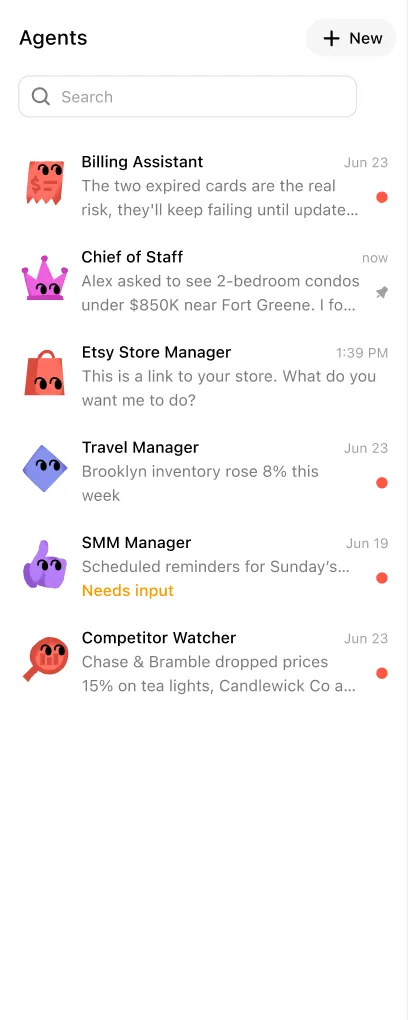



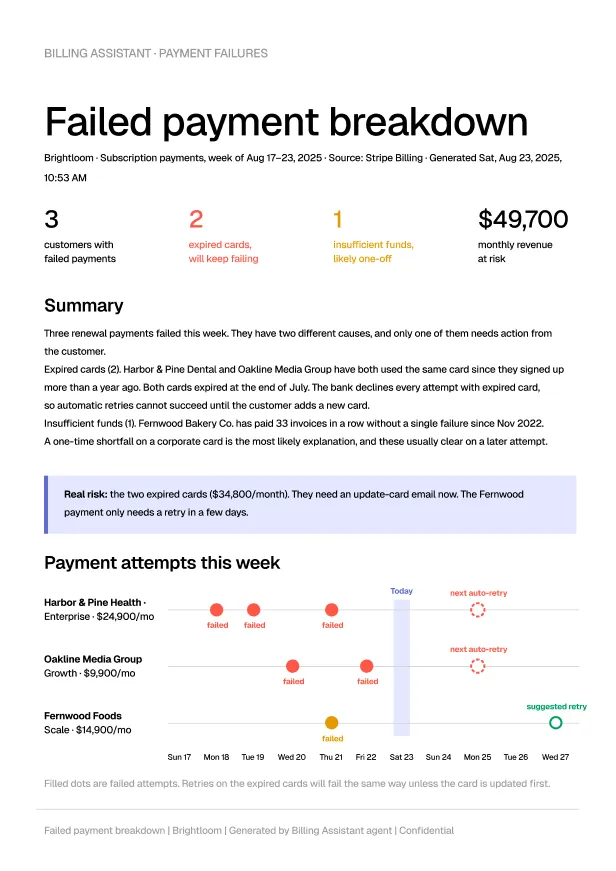
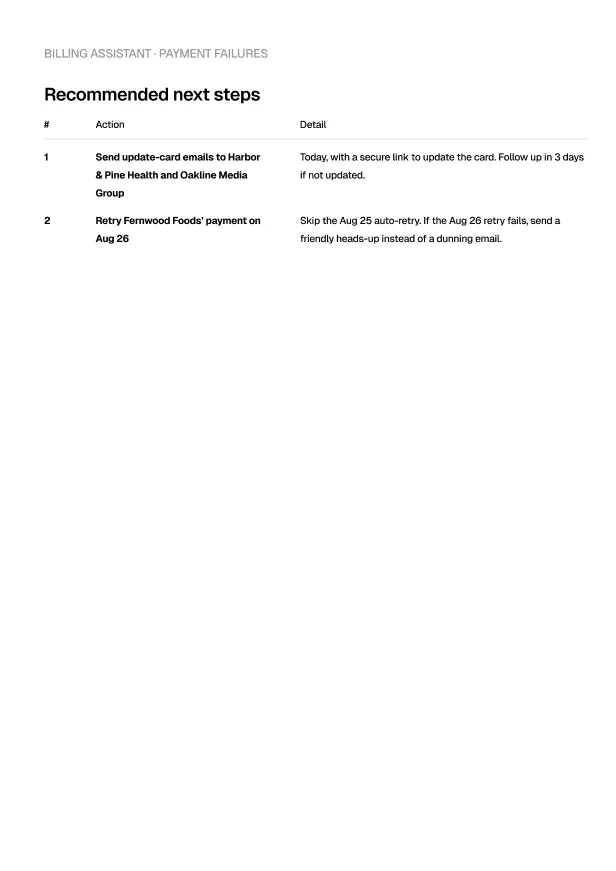

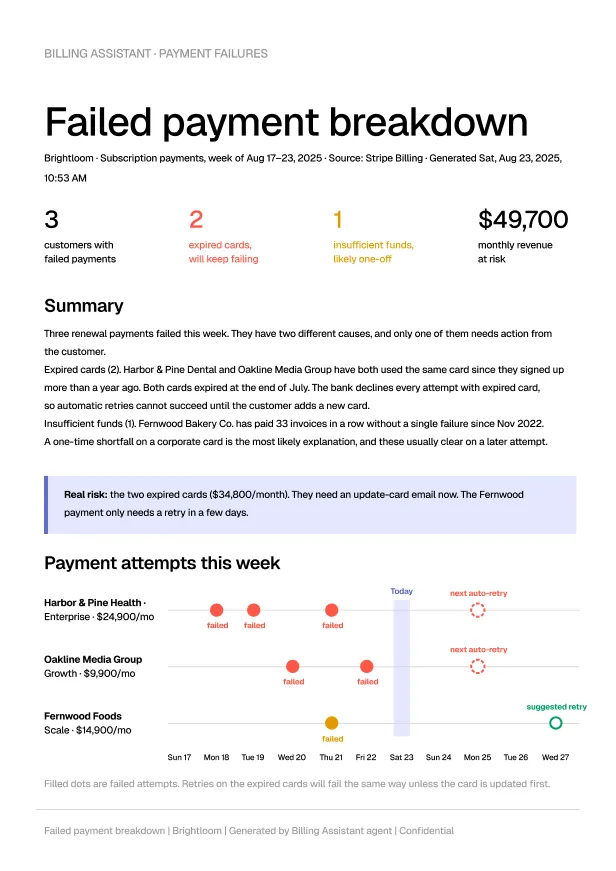
An owner asks the Billing Assistant why three enterprise accounts' payments failed this week. It finds two expired cards and one short balance, and builds a failed payment breakdown.




Invoices, reminders and reconciliation sent so you get paid on time
What your Billing Assistant gets you
An AI Billing Assistant for service businesses, freelancers and agencies that invoice clients. It sends invoices on time, chases late payments politely and matches every payment to what's owed, with you approving the wording and schedule.
Invoices built from what actually happened
Hours, orders or flat rates pulled from your tools and sent on schedule. Right client, right amount, first time
- Invoices built from tracked hours, completed jobs or fixed fees
- Sent on the schedule you set
- Correct client, amount and payment terms every time
Late payers chased, politely
Firm-but-friendly reminders at the cadence you set, in your wording, escalating gradually, so you never have to be the bad guy
- Reminders sent at the intervals you choose
- Wording that gets firmer gradually, in your voice
- You never have to write an awkward chasing email
Payments reconciled to the invoice
What landed matched against what was owed, with partials, fees and currency differences accounted for before you wonder
- Payments matched to invoices as they arrive
- Partial payments, fees and currency differences recorded
- Paid invoices closed and receipts sent
Risk flagged before it grows
Accounts drifting past their terms get called out with the full payment history, so pausing work is your call, made early
- Clients slipping past their terms flagged early
- Each client's full payment history in one view
- Decisions about pausing work left to you
Works inside the tools you already use
It reads your Stripe, PayPal and bank feed, and sends through your invoicing tool or plain email















Including QuickBooks, Stripe, Square, PayPal, Gmail, Google Sheets, Microsoft Outlook, BILL, FreshBooks, Wave, Microsoft Excel, Xero, HubSpot, DocuSign, Slack, Zapier.
And 100+ others…
Sample prompts for your Billing Assistant
Brief your AI Billing Assistant like you'd brief an office manager, covering who you bill, your terms and how firmly to chase. No invoicing know-how needed
Message Billing Assistant
Nothing changes without your say
It reads what's going on across your tools, but every change waits for your approval. Nothing publishes, nothing breaks, until you click yes.
Full access, your rules
Connect the tools it needs to do the job. You choose what it can read, and what it's allowed to change
Your approval first
Every change it wants to make waits for your approval, so nothing goes live without you clicking yes
Every action on record
See exactly what it changed and why, with a full history across every tool it connects to
Built for jobs, not tasks
Your AI Billing Assistant works month-end until every invoice is paid. It sends the bills, chases the late ones and reconciles each payment as it lands
Monday, 28

Billing Assistant
- Sent 18 invoices built from your hours and rates
- Found 5 invoices overdue

Contract Reviewer
- Flagged the new client's ask for 90-day payment terms
Tuesday, 29

Bookkeeper
- Matched $4,200 of payments to 7 invoices
- Explained a $38 card fee gap
Billing Assistant
- Showed what 90-day terms would cost you, given your slow payers
- Drafted a reply offering 30 days
Wednesday, 30
Billing Assistant
- Sent polite reminders on 5 overdue invoices, in your wording
- Staged the next ones for day 14 and day 30

Chief of Staff
- Got your yes on 30-day terms and sent the reply
Thursday, 1

Data Analyst
- Found Client X has been 45 days late twice running
Billing Assistant
- Moved 3 clients to your new 30-day terms
Friday, 2
Billing Assistant
- Suggested pausing work for Client X until they pay
- Wrote your late-fee policy once, plainly
Bookkeeper
- Updated your cash flow for the new terms
Month-end invoicing · Sep 28–Oct 2
Explore the rest of the team
- Chief of Staff
 Content Creator
 Image Generator
 Online Store Manager
 Presentation Maker
 Receptionist
 SEO Auditor
 Social Media Manager
 Software Engineer
 Ads Manager
- Bookkeeper
- Contract Reviewer
 Customer Support Manager
- Data Analyst
 Inventory Manager
 Job Description Generator
 Legal Advisor
 Payroll Manager
 Sales Executive
 Task Manager
FAQs
What is a Billing Assistant?
An AI employee that runs your accounts receivable. It sends invoices, chases late payers at the cadence you set, reconciles payments and flags risky accounts. You approve the wording and the schedule, and it does the daily grind.
Will it strain my client relationships?
The reminders read like a considerate person wrote them, because you approve the templates. Firm on the money, warm on the relationship.
Can it stop work for a non-paying client?
It flags and drafts, but pausing shipments or work stays your call, with the full payment history attached to make it easy.
Does it handle partial payments and different currencies?
Yes. Partials are tracked, fees and exchange differences accounted for, and the books see the same numbers you do.
What if I bill by the hour or by project?
Both. Connect your time tracker or project tool and invoices build from what actually happened, not what you remember.
How is this different from invoicing software?
Invoicing software sends what you type. This one runs the whole follow-through (the chasing, the reconciling and the watching), which is where the money actually gets stuck.
How long do agents run?
They don't clock out. A coworker runs continuously in the background, working when there's something to do and reporting when there's something to show you.
Do the AI coworkers work together?
Yes, and that's the point. The coworker that qualifies a lead hands it to the one that drafts the proposal, which hands it to the one that chases the invoice, so you hire the team and the handoffs happen on their own.
Can I create my own AI coworker?
Yes. Describe the job in one sentence (the outcome, the tools it should touch, when it should check in) and Maui's factory builds it, with no code, no builder canvas, and no flowcharts.
Do I need to know AI or prompting?
No. If you can write a clear message to a new hire, you can run an AI coworker, and the models, prompts, and plumbing are our problem.
What does joining the waitlist commit me to?
Nothing. There's no card, no contract and no obligation to buy, and if you join the beta the only ask is that you tell us what's working and what isn't.



Pre-launch
The AI team that runs your business

Specialist agents for every job, working 24/7.
2,720businesses already in line